A walkthrough of a root cause analysis with ilert AI SRE




It's 3am and a complaint has made its way to you: customers can't see product reviews. Nothing has crashed, and no alert points anywhere useful. Somewhere in your stack one service is failing, and the one showing the error is probably not it. Before you can fix anything you have to find it, and that search is most of your night.
Now imagine you open the laptop, type one sentence and go grab a coffee. By the time you’re back, the root cause is ready, evidence attached. Your job is to check it.
That's what this post is about. We walk through one investigation ilert AI SRE ran on a bug in our demo shop. Then we rewind and show what we had to set up for it to work.
Prefer to watch? Here’s the whole investigation in under four minutes. The setup isn’t in the video, so that part is below.
The symptom
EWER is a shop we built to test the agent. It acts like a small online store. Behind it are 15 Rust services with logs, metrics and traces, set up the way you'd run them in production.
Open the product page for a T-shirt and everything loads, including six reviews. Some time later, the same page still shows the price and the description. Where the reviews were, one line says "We couldn't load reviews just now" and asks you to try again later. Other products look fine.
No pod is restarting and no alert says "down". The service that shows the error is only passing it on from somewhere else. And it hits some products but not others, for no reason you can see from the outside. Every place you'd normally look looks healthy.
We didn't plant this bug for the demo. It shipped with the feature that added order refunds.
The investigation
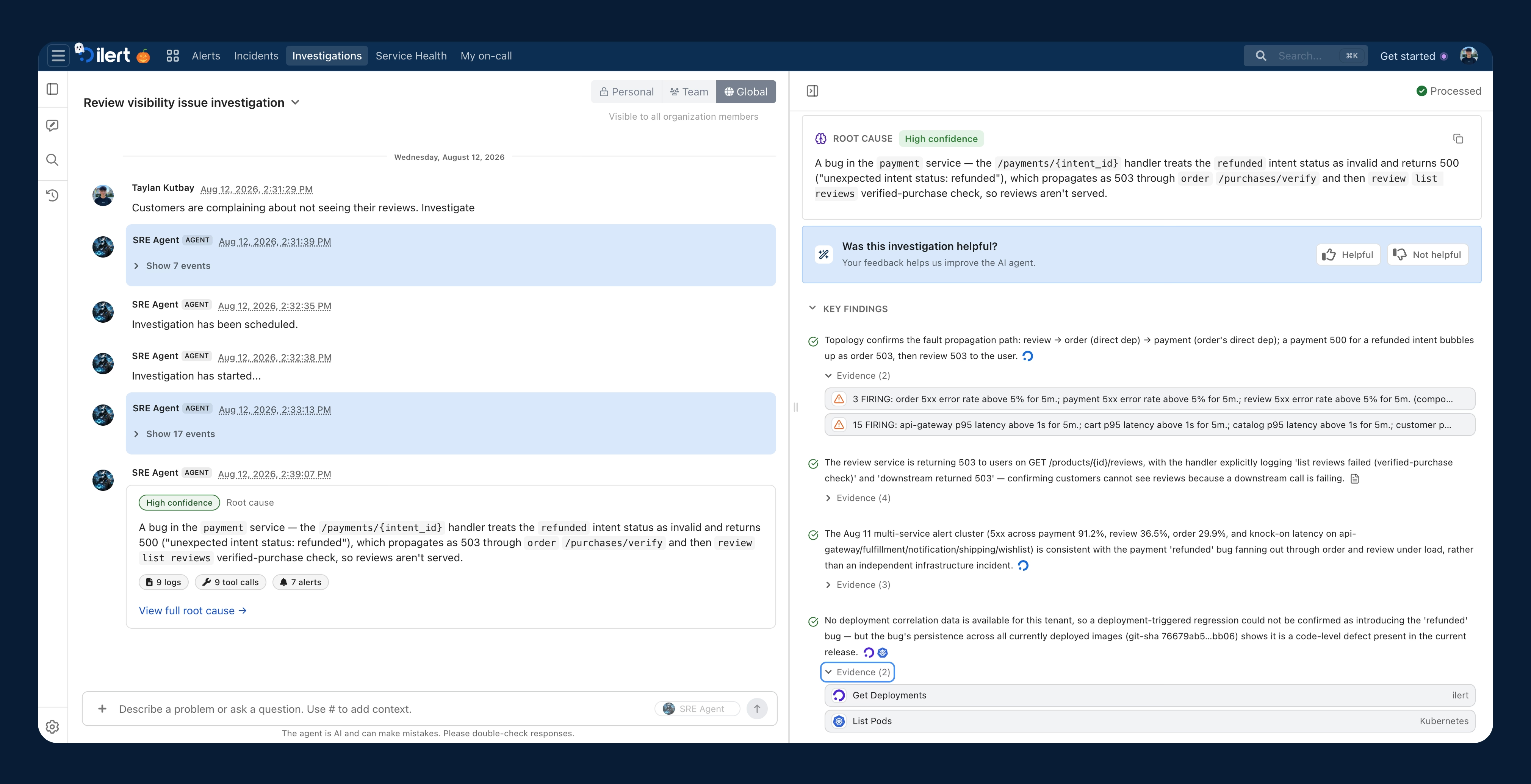
We gave the agent what support gave us, typed into the agent's chat: "Customers are complaining about not seeing their reviews. Investigate."
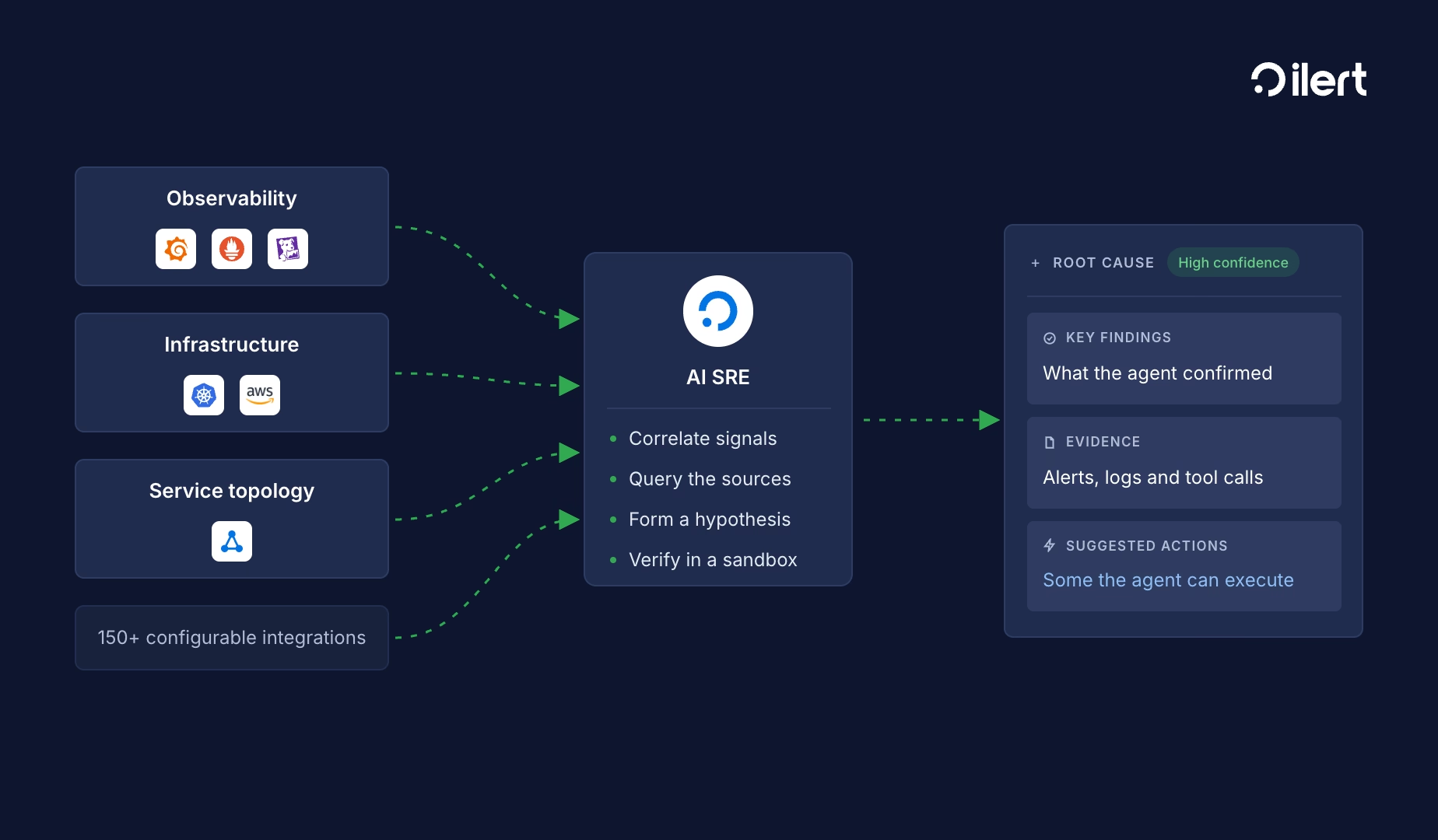
It started with what ilert already knew: open alerts about reviews, recent deployment events, and the service topology, which told it what the review service depends on. Then it went to the cluster and the logs. It does that part in an isolated sandbox: a separate environment automatically set up just for an investigation, which can reach your systems only through the tools you connected. The review pods were healthy, so it followed the requests downstream, from reviews to orders and from orders to payments. It found the error in the payment logs.
A few minutes after the prompt, it posted its answer and marked it high confidence. To show a "verified purchase" badge, the reviews page asks the order service about every single review, and the order service asks payments. The payment service didn't know what to do with a refunded order and returned an error. Nothing along the way caught it. So one refund took down the reviews for that product, for every visitor.
That was right. We knew the answer going in, and it matched.
By hand, we'd have started in the review service, since that's where the error shows up. Its logs point to the order service, the order logs point to payments, and there you find the refunded order. That's three services, maybe 30 to 45 minutes if you pick the right one first. We probably wouldn't have: the review pods had a history of out-of-memory alerts, and that's what we'd have chased first. The agent checked those too, and ruled them out.
What made the answer usable was the evidence. Every finding links to the log line, alert or tool call it came from. A root cause that only sounds plausible is worthless at 3am, because you end up checking every claim yourself anyway. Checking it meant clicking through that chain, which took us a couple of minutes.
The run had a few misses, too. Two of its searches in the payment logs came back empty, even though the error was there all along. But then a broader search still found it.
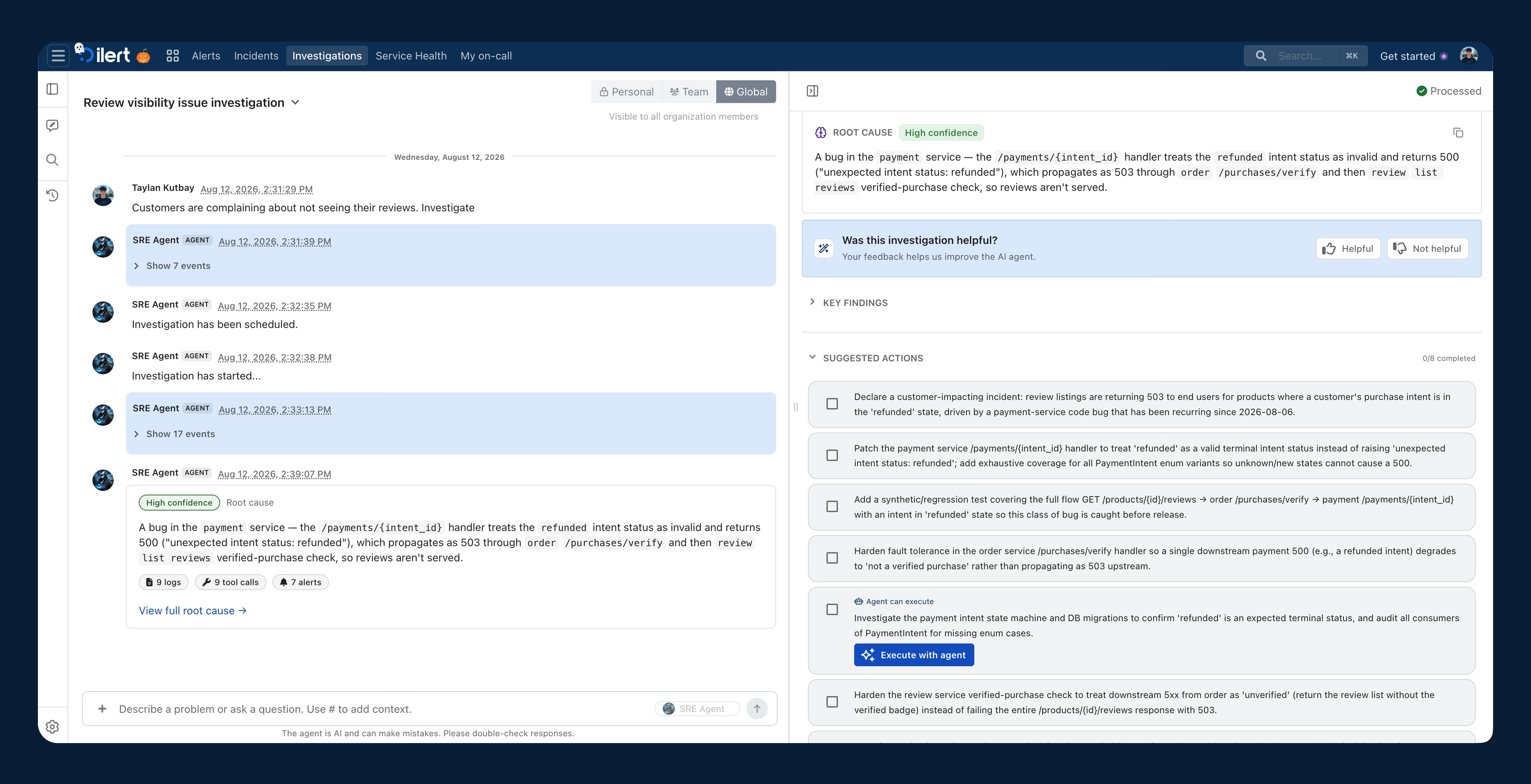
It ended with eight suggested actions, among them: fix the payment service, add a test for refunded orders, and let the reviews page show reviews without the badge when the check fails. The agent offered to take on one of them itself: checking whether anything else that reads payment statuses has the same bug. One click on "Execute with agent" starts it. What else it can take on depends on the tools you connect and the permissions you give it.
What had to be in place
The agent only sees what you connect, so the setup decides how good an investigation can be. For EWER it came down to three steps.
- Turn on AI features in your account settings and create an agent for one team or for everyone.
- Connect your logs; the agent can't be activated without them. We connected Grafana, which gave the agent our logs in Loki and our traces in Tempo. A service account with the Viewer role is enough.
- Connect where your services run. We installed ilert-kube-agent in the cluster, so we can connect the Kubernetes MCP to our AI SRE, so it can see pods, their status and their logs.
ilert builds the service topology, the map of which service calls which, from your tracing data when you set up the agent. It's the reason the agent went from reviews to orders to payments instead of guessing.
Each connection then lists its tools, and you choose which ones the agent may use.
Two things we ran into. The agent can't use what it can't reach: when our EWER cluster was down, every call to it waited for a timeout and the investigation crawled. And a database connection can be switched off without anyone noticing: when we added one, every query failed until we found the switch. If a whole group of tools fails, check the connection before you blame the agent.
If we set up EWER again, we'd connect GitHub from day one. The agent found the broken code path from the logs alone, but with the repository it could have pointed at the pull request that introduced it.
What it doesn't do
- It doesn't start on its own. You ask, it investigates.
- It doesn't change your systems on its own. It suggests actions, and you decide whether to approve it or not.
- It only sees what you connect, and you can choose its tools one by one. Anything that writes can simply stay off.
This investigation also shows where we'd draw the line today. One of its suggestions was a stopgap: have the payment service skip the refunded payment when it reads from its database. That would have brought the reviews back. It's also a quick change to payment code, made under pressure, and hard to undo cleanly. Anything that touches money or customer data, or can't be rolled back, stays with a human.
Q&A
What do I need connected before ilert AI SRE is useful?
Logs, at the very least. In practice you want logs, traces and access to where your services run, like Kubernetes. Traces do double duty: they're evidence, and they're how ilert learns which service depends on which.
How long does setup take?
The ilert part takes minutes: create the agent and connect your tools. The time goes into your side, like creating a read-only Grafana account or installing the Kubernetes agent and making it reachable from ilert.
Does it act on production by itself?
No. It needs only read access to investigate, and it suggests what to do. Tools that write stay off unless you enable them, and nothing changes until an engineer approves it.
What data can it access, and where does it run?
Only what you connect, and read-only keys are enough. Each investigation runs in its own isolated sandbox, which reaches your systems only through those connections. For EU customers, all AI processing runs on dedicated servers in Frankfurt and Stockholm, and no data leaves the EU. Your data isn’t used to train models.
What kinds of incidents is it good at?
It saves the most time when the symptom and the cause sit in different places, like a reviews page failing because of a bug in payments. When the cause is in the service that shows the error, it handles that too, but you’d likely have found it quickly yourself. The real limit is telemetry: if your logs, metrics or traces never record the problem, the agent won’t find it either.
Create a free ilert account, connect your logs, and start your first investigation from an alert you already have. If you’d rather see it on a live system first, book a demo and we’ll walk you through it.