Boosting Rust developer productivity with Cursor – Our journey at ilert



AI-assisted coding has evolved from a novelty into an industry standard. At ilert, we started our adoption in mid-2023, quickly realizing that success depends heavily on proper context and workflows. This is particularly acute with Rust. While the language is central to our backend infrastructure, its strict compiler rules and distinct idiomatic approaches make it notoriously difficult for modern LLMs to master. Consequently, we spent significant time optimizing our AI-first development practices – an investment that has successfully eliminated development friction and streamlined our onboarding.
This article documents our journey from local code edits to a structured, context-aware workflow using Cursor. We will share the exact strategies, rule files, and planning workflows that turned the AI from a toy into a reliable contributor.
Our journey from code snippets to multi-agent workflows
At ilert, we are open to new technologies and actively monitor market trends, incorporating the best offers into our workflow. The AI was not an exception. At first, we treated AI as a "better Stack Overflow". We started by using ChatGPT for writing code snippets. We composed several custom GPTs for writing unit tests and documentation. Then subscribed to GitHub Copilot for smart autocompletion. And then came Cursor. At first, we were quite skeptical since the tool had quite a lot of bugs, and the outcome was far from desired. But its ability to utilize the index of the code base was quite promising.
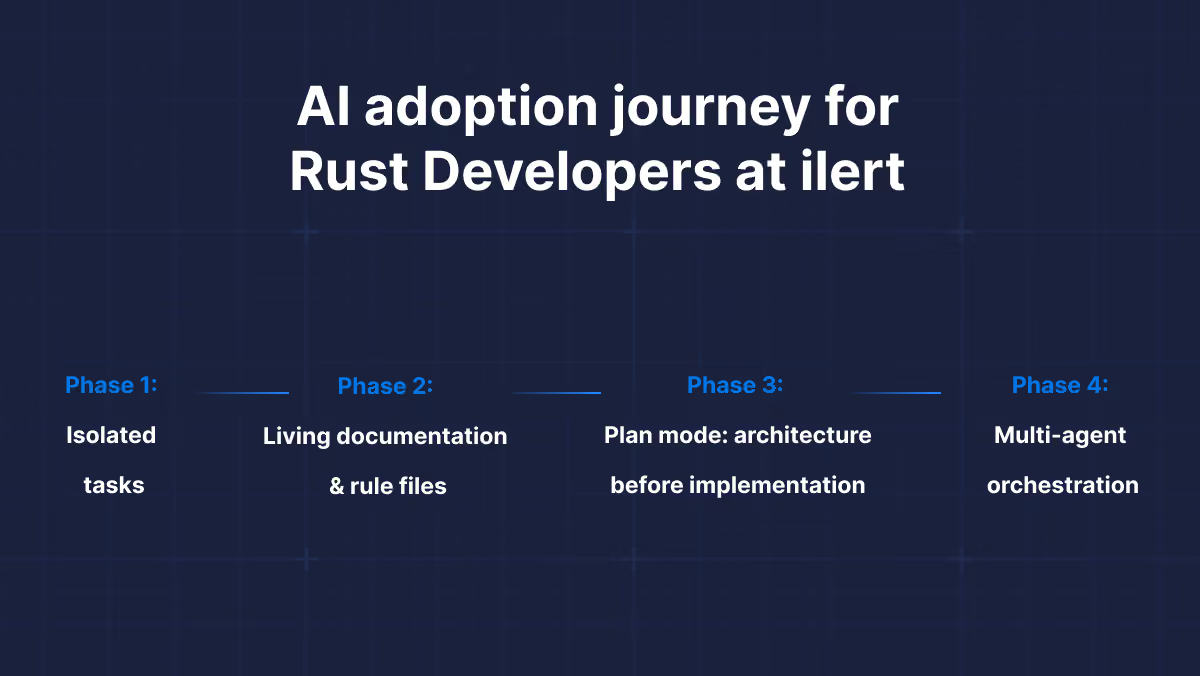
Phase 1: Isolated tasks
Initially, we used Cursor for isolated tasks. An engineer might ask ChatGPT to "implement a POST endpoint for the Incident entity." The scope was small, and the results were often hit-or-miss. In Rust, this often resulted in code that technically worked but violated Rust idioms or existing architecture in our codebase.
Phase 2: Living documentation & rule files
We realized that the AI was only as good as the context it could "see." But rather than pasting context into every chat, we shifted to a different approach: treat documentation and rules as first-class code artifacts.
We introduced two key practices:
.cursor/rules/: Project-specific rule files (likerust-coding.mdc) that Cursor automatically loads into every interaction. These rules encode our engineering standards – error handling patterns, concurrency models, preferred crates – so the AI starts every task already "knowing" our conventions.- Living documentation: Files like
ARCHITECTURE.mdthat document decisions, not implementation details.
This phase was transformational because the context became persistent and automatic. No more copy-pasting. The AI simply inherited our engineering culture from the repository itself. We will share the exact rule definitions and file structures that power this later in the article.
Phase 3: Plan Mode – architecture before implementation
The introduction of Plan Mode marked the next evolution in our process, shifting our workflow from 'generate code and iterate' to 'design first, build once'.
Even with proper rules, letting an agent immediately jump to code often produces solutions that are technically correct but architecturally questionable – instant technical debt. To counter this, we implemented a strategy we call the "Rule of Three". For any significant change, we start with the Plan Mode, framing the prompt as follows:
Combined with our rule files, Plan Mode ensures the AI generates code that aligns with our long-term vision. The specification and implementation stay in the same context, allowing us to review the architecture before a single line of code is written.
A note on plan entropy: We noticed a specific limitation in the current version of Cursor: if you iterate on a generated plan too many times, the model tends to "forget" constraints and useful solutions established in the first version. To prevent this context drift, we trigger Ask Mode for complex tasks before entering Plan Mode. This allows us to clarify requirements and edge cases upfront, resulting in a robust initial plan that requires fewer follow-up changes.
Phase 4: Multi-agent orchestration
The latest evolution moves beyond a single AI assistant to coordinated multi-agent systems. Instead of a single agent handling everything, we now orchestrate specialized sub-agents, each with specific tools and expertise.
The general pattern looks like: top-level Orchestrator agent coordinates sub-agents:
- Architect agent: Thinks on the problem from a high-level perspective, evaluating several solutions, may propose to make a POC before coming to a conclusion.
- Implementation agents: The builders executing the planned changes.
- Verification agents: Quality gatekeepers that ensure architectural standards, SOLID rules, proper testing, etc.
The power is in parallelization and specialization, effectively managing LLM's context and focus. Our early results show up to 2x faster iteration on complex tasks. We will explore this approach in detail in future articles. For now, let's start with the basics of AI-first development.
Context engineering: Why documentation is the new code
In the pre-AI era, documentation was often the last thing written and the first thing to go stale. A human developer could bridge the gap between an outdated README and the actual code. AI lacks that intuition. If your documentation contradicts your codebase, the AI will hallucinate a bridge between the two, resulting in code that appears correct but fails silently.
We realized that to make Cursor effective, we had to shift our mindset to "AI-first documentation."
Keeping the context window clean
As soon as you open a repository in Cursor, it indexes your code to understand the project context. If that index is filled with deprecated architectural decisions, the model's prediction quality degrades.
To combat this, we introduced a strict protocol: Documentation is a compile-time dependency.
- The
ARCHITECTURE.mdfile: Every service includes this file. It doesn't list endpoints (which change often); it lists decisions. This gives the AI and newcomer developers the "why" behind the code. - Standardized folder structure: We enforce a consistent layout across all Rust services (
src/domain, src/infrastructure, src/api). Because every project looks identical, the AI can predict where a new file belongs with near 100% accuracy, reducing the need for us to specify paths in prompts.
The "Fix the Rule" loop
One of our most impactful productivity changes was how we handle AI errors. Previously, if Cursor generated code that violates our patterns, we would simply rewrite the code with follow-up commands. Now, we treat an AI failure as a documentation bug.
If Cursor generates code that struggles with the borrow checker or introduces a deadlock, we don't just fix the code – we patch the rule file or other context documentation. We ask: "What instruction was missing that allowed this mistake?" This turns every error into a permanent improvement for the entire team.
The secret sauce: ilert's Rust rules
Documentation provides the context, but Rules provide the constraints. Historically, the first approach was a single .cursorrules file at the repository root. Now we use several rule files in .cursor/rules/:
- Language-specific rules
- General programming best practices
- Refactoring rules
- Security analysis rules
Separation of files helps their maintenance, reduces LLM context, and facilitates their reuse across projects. For Rust, we use a dedicated rule file rust-coding.mdc (provided in the appendix). Here we will discuss several important points.
Key constraints we enforce
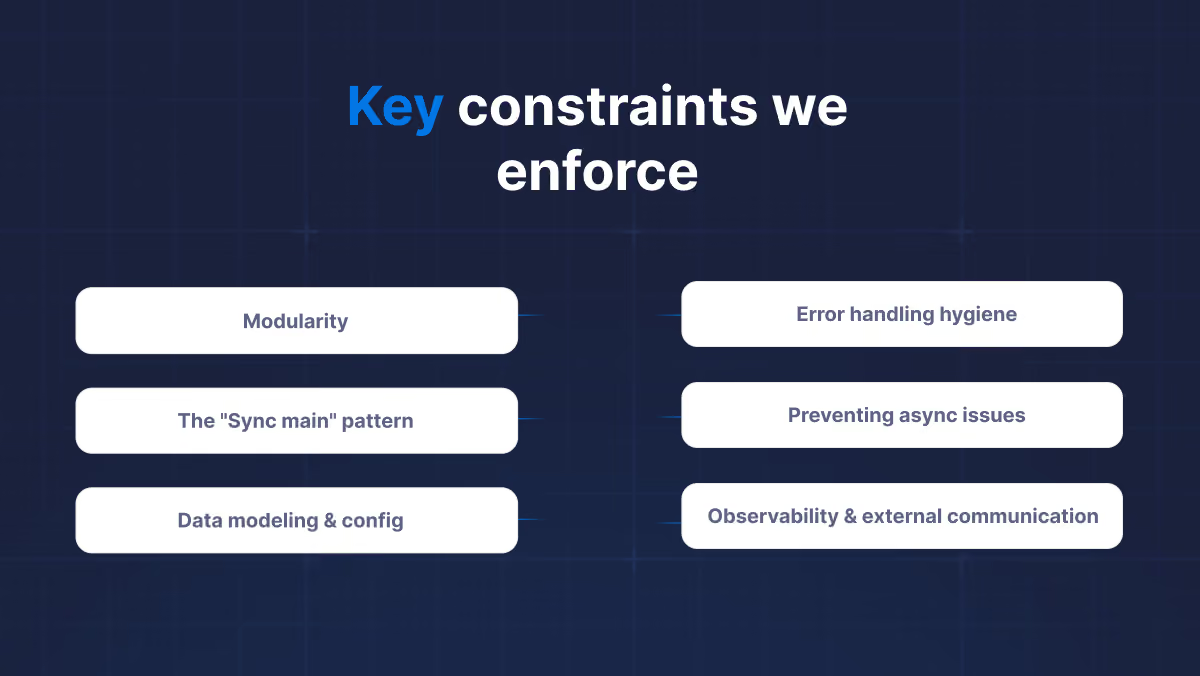
1. Modularity
- The rule: Keep
main.rsto a minimum – onlymain()that loads config and callsruntime.block_on(run(...)). Put the async entry point in a dedicatedrun.rs. Inlib.rsandmod.rs, only list modules. Group modules by domain (e.g.,src/http, src/config,src/use_case_xx). - The why: The thin main and lib modules facilitate testability and lifecycle reasoning. Domain folders and optional heavy dependencies (e.g., Kafka) ease integration testing without spinning up all the infrastructure.
2. The "Sync main" pattern
One of the main struggle points for Cursor with Rust is handling Rust lifetimes in asynchronous code. That leads it to produce a lot of unnecessary clones or mutexes, introducing accidental complexity.
- The rule: "Start the
main()in sync mode, configure the application, then launch the Tokio runtime at the end." - The why: This forces the AI to allocate long-lived resources (like database pools or config objects) in the stack frame of the
mainfunction before the Tokio runtime starts. Cursor can use a trick withBox::leak(Box::new(some_global))to obtain'staticreferences, simplifying further lifetime management.
3. Data modeling & config
- The rule: Newtype IDs, serde for DTOs with
camelCase,derive_builderfor complex construction, validator on incoming DTOs. Use theconfigcrate with YAML and environment overrides so all settings are validated at startup. - The why: Consistent DTO representation and validation at the boundary hardens APIs, gives clear errors, and makes the AI generate the same patterns every time.
4. Error handling hygiene
- The rule: "Define one
thiserrorenum for use-case-wide business logic and useanyhowfor generic errors." - The why: It prevents the AI from creating too many custom error enums, while ensuring that business logic can benefit from matchable errors. We prefer
Fromtrait implementation overmap_err(), and banunwrap()in production code to facilitate clean and idiomatic Rust code.
5. Preventing async issues
- The rule: "Strictly forbid holding
std::sync::Mutexacross an.awaitpoint." - The why: This is a classic Rust mistake that blocks the Tokio runtime. Syntactically, it looks correct and compiles.
6. Observability & external communication
- The rule: Use
tracingwith structured fields; useimpl FromRequest for Claimsfor Actix auth; usereqwestwith retries and observability middleware for outbound HTTP. - The why: Sometimes Cursor may decide to use
awc::Client, but it is notSend, making it harder to pass intotokio::spawn, for example. So we enforcereqwest-based client, along with its middlewares for production-grade error tolerance and observability.
The full rule file is in the Appendix at the end of this article. You can drop it into .cursor/rules/rust-coding.md and adapt it to your stack.
Experiment: No-rules vs. rules vs. planning
To quantify the impact of our workflow, we ran a controlled experiment. We gave Cursor the same prompt in three setups:
- Naked: No rule files.
- Guided: With
rust-coding.mdc. - Architected: With rule file + Plan Mode.
Note on bias: We had to perform the "Naked" experiment on a fresh Cursor account. We found that Cursor's cloud-stored embeddings are sticky; even without rule files, it "remembered" our previous patterns from other sessions. A fresh account was necessary to see the true baseline performance. And here is another implication: if you expose Cursor to code with bad patterns, it may start repeating them in the new code it writes, so be careful what you 'feed' to Cursor. The prompt is intentionally quite vague to explore the bias in Cursor:
Scenario 1: The "Naked" cursor (no rules)
The generated project does not compile. We can notice that the Kafka consumer is spawned with tokio::spawn while passing in a shared awc::Client. awc::Client is not Send because it relies on Actix's single-threaded types (e.g., Rc), and tokio::spawn requires the future to be Send, so the compiler rejects the variable.
The problematic snippet:
The code does not facilitate maintainability and extensibility:
- Modules consist of a flat set of files in
/srcwith no domain grouping. - Many modules have mixed functionality, such as message consumption and HTTP calls in
kafka.rs, loading environment variables and setting up server routes inmain.rs, etc.
Scenario 2: With a rule file, no plan mode
With the rule file active, the project successfully compiles. The Cursor chooses a Send-safe HTTP client backed by reqwest, with a separate facade for the HTTP client.
But we can notice that the modularity rules are not fully applied. For example, there is no module grouping by scope and functionality; all source files are in a single folder. More importantly, there are too many error enums: one in kafka.rs, another in config.rs, and so on. Cursor obviously misunderstood our rule.
So this way you get a working, compilable service, but the architecture is not as nice as it could be. It seems Cursor lacks project-wide thinking in this case. And here comes the Plan mode to the rescue.
Scenario 3: With a rule file and plan mode
With both the rule file in place and starting with a Cursor's Plan Mode, the generated service follows most of the rules consistently: HTTP client and configuration are in dedicated modules, modular layout with http/, forwarding/, server/, shared/ – suitable for testing and extension. The main.rs is quite clean:
Outcomes: The shift from writers to reviewers
After years of refining Cursor workflows, the impact on our engineering velocity has been significant:
1. Streamlined onboarding
The most surprising benefit of a strict rule file and "AI-First Documentation" has been onboarding. When a new engineer joins ilert, they don't need to memorize all our coding guides before contributing. Cursor acts as a pair programmer who already knows our conventions.
2. From syntax to architecture
Our engineers now spend significantly less time writing boilerplate code, fighting the Rust borrow checker, or debugging obscure async runtime errors. The AI handles the "plumbing." This frees up our team to focus on thinking about complex business logic, paying more attention to details that matter. We have effectively shifted from being "Code Writers" to "Code Reviewers and Architects."
3. Predictability at scale
By treating our prompts and rules as code, we have achieved a level of consistency that is hard to maintain in a growing team. Spinning up new microservices and integrating them into our infrastructure landscape became obvious. The volume of code-review iterations decreased drastically.
Conclusion
If you are a Rust developer or an engineering leader looking to boost productivity, we encourage you to stop treating AI as a chatbot. Treat it as a junior engineer. Give it a handbook (.cursor/rules/), give it context (ARCHITECTURE.md), and force it to think before it types.
Based on our journey, here is our checklist for effective Cursor development:
- Iterate on design, implement once: Start significant changes in
Plan Mode, ask AI for different solutions. UseAsk ModebeforePlan Modein complex cases - Treat documentation as a dependency: Maintain AI-optimised (compact, structured, and non-contradictory) documentation with key decisions and constraints.
- The "Fix the rules" loop: When the AI makes a mistake, don't just fix the code. Update your rules to prevent that class of error permanently.
- Sanitize your context: Be careful with what you index. Use .
cursorignoreto exclude irrelevant information. If you feed Cursor a legacy codebase full of bad patterns, it will replicate them.
The tools are ready. It's up to us to build the future with them.
Appendix: ilert's Rust rules
The complete rust-coding.mdc we use. Feel free to copy and adapt as needed.
.avif)
.avif)