From BigQuery to ClickHouse: How we made our analytics 5× faster



Why BigQuery stopped working for us
For years, ilert has given our customers extensive analytics across their alerts, notifications, and on-call activity, a comprehensive overview of how their teams and services respond to incidents. These capabilities were backed by a separate analytical database running on Google BigQuery. It held the numbers behind every reporting dashboard in ilert, and for a long stretch it was perfectly fine.
Then three problems grew too big to ignore:
- It was the slowest experience on our platform. Analytics dashboards aren’t on ilert’s hot path, but they were noticeably sluggish, several seconds on average, and up to twenty seconds for our largest customers. Not the experience we wanted to offer.
- We paid per query. BigQuery bills by bytes scanned, and our workload is the same handful of dashboards run over and over, so we kept paying, again and again, to answer questions we’d already asked.
- Updating a row was difficult. Some of our analytics aren’t append-only, for example, an alert’s state, TTA (time-to-accept) and TTR (time-to-resolve) all change as the alert is acknowledged and resolved, and we need the stored row to follow. BigQuery is built around appends and full rewrites; row-level updates there are slow and awkward.
There was a bonus reason too: BigQuery happened to be the last workload keeping us on Google Cloud, so retiring it let us drop a whole provider, and a subprocessor from our tech stack.
So we moved our analytics to ClickHouse, running on our own AWS infrastructure. Queries that used to take around ten seconds now come back in under two. Here’s how we got there.
Our workloads
Our analytical workload consists mainly of:
- Events: the raw alerting events ilert ingests and handles. A high-volume, append-only stream, the source data everything else is built from.
- Statistics: the aggregates behind our core capabilities: alerts, notifications, and on-call reports.
- Entity state transitions: the history of how our core entities move through their lifecycle: call flows, event flows, incidents. We log what happened over time, with each transition as its own distinct row, one per entity per change.
Those three workloads shaped both the problems above and the design below. What we needed was a fast, columnar database, tuned for tenant-scoped, time-range reads, with a table engine that could also handle mutations. The shortlist also included Apache Druid, Apache Pinot, StarRocks, and TimescaleDB. But ClickHouse matched our access pattern most closely, and just as important, it wasn’t a risky bet. We had been following the project for years and watching it mature. In that time it has become a well-established choice for large enterprises like Uber, Cloudflare, and Cisco.
Why not just tune BigQuery?
It’s the fair question, and we asked it first. BigQuery has real answers for slow interactive dashboards, BI Engine, reservations, materialized views, and any of them would have helped with the speed, and probably the cost too.
But every one of them keeps us on Google Cloud. By this point BigQuery was our only remaining GCP workload; everything else already ran on our own AWS infrastructure. Tuning BigQuery would have fixed two of our three problems while permanently cementing a second cloud provider, and a second subprocessor, into the stack. Moving the workload instead let us fix the speed and the cost and collapse two providers into one. That is what decided it: migrate, rather than optimize in place.
Getting data in, Kafka in the middle
As is common in the industry, our operational and analytical data stores are decoupled and only eventually consistent, with a buffer in between. We were already using Kafka for that buffer, so it was the natural choice for feeding data into ClickHouse too.
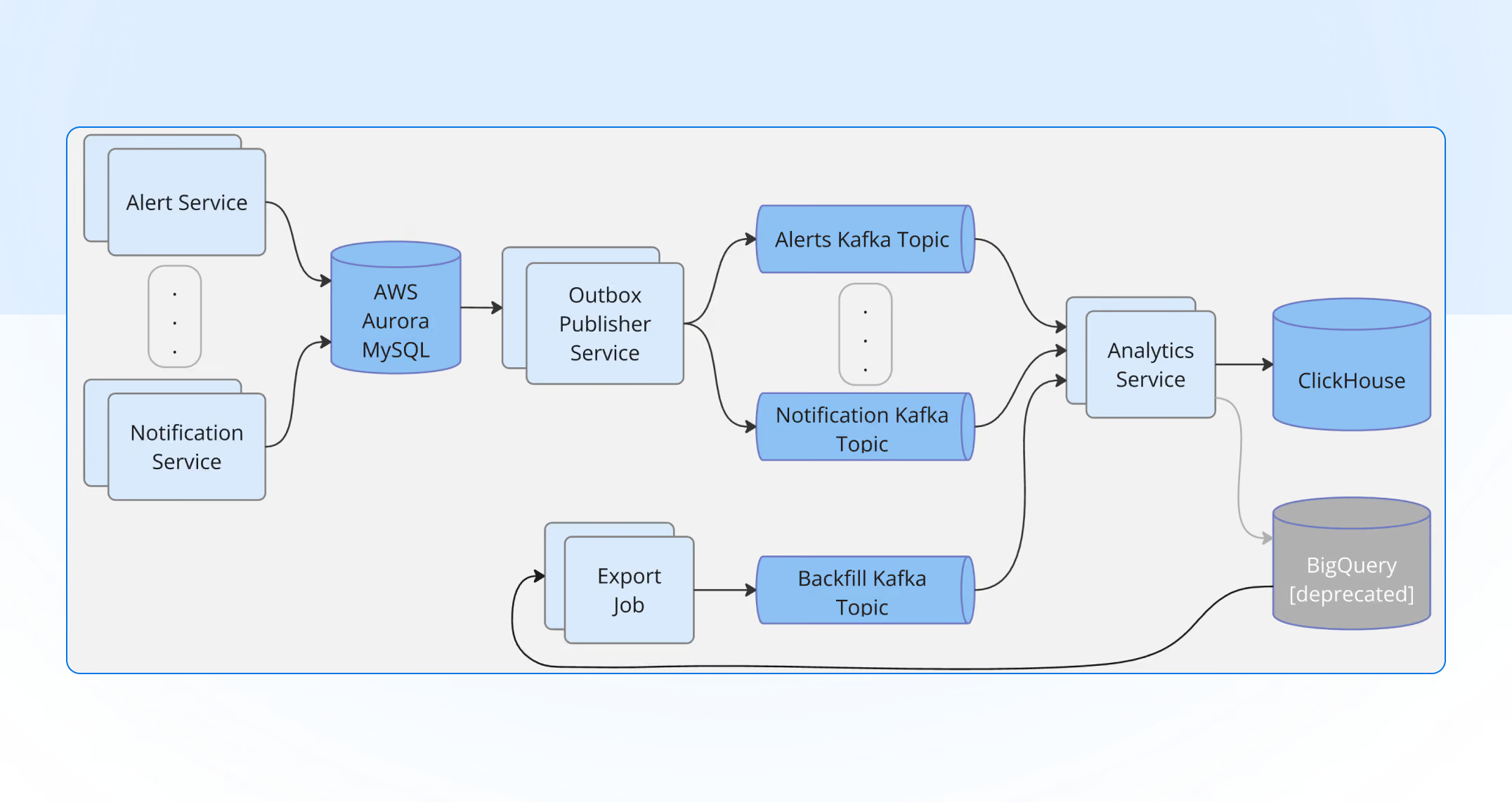
The realtime flow:
- Source services own their operational data as they always have.
- A dedicated CDC (change data capture) service reads change events and exports them onto Kafka topics, one logical stream per workload.
- Consumer workers read from Kafka, batch rows client-side, and insert into ClickHouse.
The backfill flow reused the same path, with a different source:
- An export job reads the historical BigQuery tables, one by one, and streams the rows into a Kafka topic.
- A backfill consumer batches those rows and inserts them into ClickHouse, the same way the realtime consumers do.
Those consumer workers needed to do one thing well: insert rows into ClickHouse efficiently. ClickHouse is fastest with large, infrequent inserts and slow with many small ones, so each consumer batches rows client-side, flushing on whichever comes first, a size threshold or a short timer, and commits its Kafka offset only after the batch lands. Offset and insert move together; otherwise a crash could acknowledge rows that never reached the table.
Why route through Kafka instead of dual-writing?
- Decoupling. The source services don’t know or care that ClickHouse exists. If the analytical store is down for maintenance, events queue in Kafka; nothing upstream blocks.
- Replayability. Getting a schema or a transform wrong is normal during a migration. With the stream retained in Kafka, we can rewind offsets and re-ingest into a corrected table instead of asking every source service to send its history again.
- Backfill and cutover in parallel. We backfilled history into ClickHouse while the live stream kept flowing, then flipped reads over once the two agreed.
- Natural batching boundary. ClickHouse wants large, infrequent inserts, not a trickle of single rows. A Kafka consumer is the ideal place to accumulate a batch and flush it.
Designing the ClickHouse schema
One of the main decisions each ClickHouse adopter has to make is the choice of table engine, which comes down to one question: can the data be mutated, and in what way.
Beyond the engine, our tables share a few conventions. Each one is sharded across the cluster and replicated for durability, partitioned by month, and sorted by tenant and then time, so a tenant’s date-range query touches the smallest slice of data possible. Columns are compressed with type-appropriate codecs, and every table carries a TTL that ages data out on its own retention schedule instead of letting it grow forever.
Analyzing our use cases, there is one that clearly requires mutability:
- Alert analytics: as an alert moves from triggered to acknowledged to resolved, we simply insert it again with its new state; ClickHouse keeps the newest version and drops the older ones as it merges. Reads ask for the current state with
FINAL, which removes those old versions at query time. This isReplicatedReplacingMergeTree.
But keeping in mind the need to backfill, we decided to use the “replacing” engine for all other migrated tables as well.
Why this shape makes fixing migration issues safe
Migrating data is messy. You almost always get halfway through, notice a transform was subtly wrong, and have to run the whole backfill again. On a plain append-only table, re-running means every row you already inserted lands a second time, so re-ingesting the backfill turns into a truncate-and-start-over task, and it is risky every time.
The “replacing” engine changes this. Because it deduplicates by the full ORDER BY tuple and keeps the row with the highest version column, re-ingesting the same logical rows from the stream simply replaces them, while any rows missing the first time just get filled in. Re-ingesting the backfill stops being cleanup and becomes something you can safely repeat: rewind the consumer, let it run, and the table ends up in the correct state. Nothing duplicates, nothing needs truncating, and FINAL gives you the clean view even before background merges catch up.
The FINAL isn’t free, but it is acceptable for us because none of the APIs backed by these tables are on a hot path of the platform, so in practice the overhead is negligible.
The tricky part: porting the queries
Setting up the tables was the easy half. Porting the analytical queries from BigQuery’s SQL dialect to ClickHouse’s took far more attention, and the dangerous bugs weren’t the ones that raised an error. They were the ones that returned a perfectly plausible number that happened to be wrong. Even with the help of AI assistants, it took several iterations to map each one properly, leaning on our test data to make the new queries functionally identical to the old ones.
A few of the traps that bit us:
%Mis the month, not the minute. In ClickHouse’s formatDateTime,%Mprints the full month name and%iis the minute. We ended up using the provided shortcuts:%F=%Y-%m-%d,%T=%H:%i:%S- Non-aggregated columns. BigQuery lets you SELECT a column that isn’t in the
GROUP BY, as long as it is functionally determined by it. ClickHouse refuses. Just adding the column to the GROUP BY silently splits rows and double-counts if that column ever varies within the group. The correct fix is to wrap it with aggregates likeany()ormin(). - Indexing starts at 1. ClickHouse arrays and tuples are 1-based. BigQuery’s
[OFFSET(0)]for the first element becomes[1], and tuple fields aret.1,t.2. - Averaging over “skipped” rows. In our data a TTA or TTR of
0means the alert was never acknowledged or resolved, not that it took zero seconds. A plainAVGwould count those zeros and drag the number down, so we had to use the following expression:COALESCE(ROUND(AVG(CASE WHEN x != 0 THEN x END)), 0).
The trade-offs we accepted
Self-hosting ClickHouse brings complexities of its own, and we took them on consciously:
- We operate it now. Replication, ZooKeeper, server upgrades, backups, capacity planning, the things BigQuery did invisibly are our team’s job today. We took that on deliberately; it’s the cost of controlling performance and consolidating onto one provider.
- We size for peak. There’s no serverless elasticity. The cluster is provisioned for our busy periods and sits under-used the rest of the time. For a workload as predictable as ours, that still comes out cheaper than paying per query.
The results
The number we cared about most improved the way we hoped: p95 dashboard query latency dropped from around ten seconds to under two, roughly a 5× speedup.
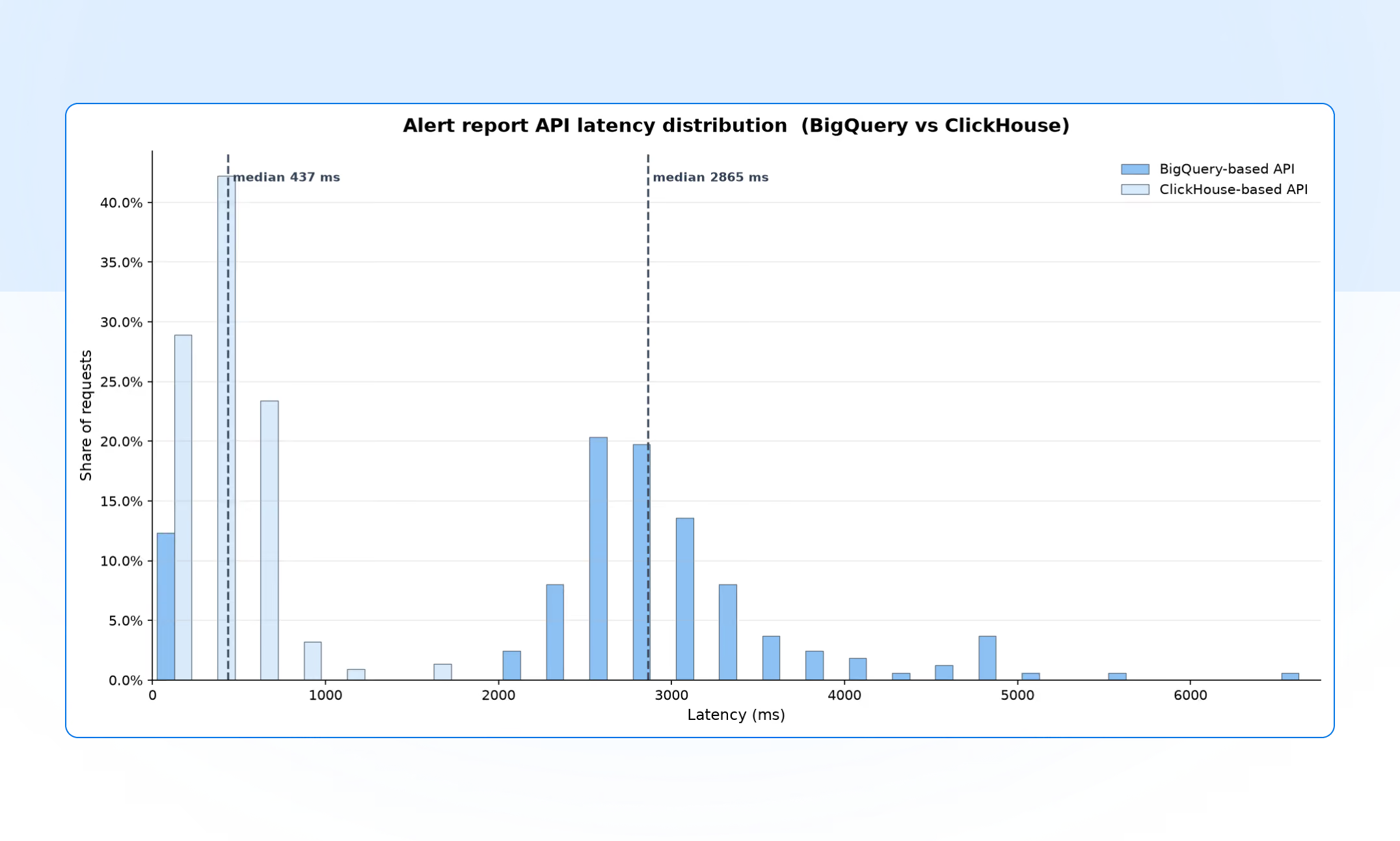
Everything else followed from the design:
- Cost: per-query scan billing is gone, replaced by the fixed, predictable cost of a cluster running on hardware we already operate.
- A leaner schema: being able to update the alert-state field through ReplacingMergeTree let us drop to a more compact table layout, instead of the append-and-rewrite workarounds BigQuery required.
- Operational resilience: with Kafka buffering ingestion, a ClickHouse maintenance window is a queue that drains later, not lost data, and a bad transform is a replay, not an incident.
- One less dependency: BigQuery was our last workload on GCP. Retiring it dropped a whole cloud provider from our tech stack.
All in all, we’re happy with the migration. The wins above were the goal, but the bigger payoff is what it opens up: with fast, affordable, real-time analytics as our new baseline, richer reporting and deeper insights are suddenly cheap to build. Expect a lot more analytical capabilities landing in the ilert platform soon.
.avif)